One of the most common questions asked by SAP beginners and even by business users encountering SAP for the first time is:
Why are there so many Material Master views in SAP?
This question usually arises when users open a material in SAP and see dozens of views such as Basic Data, Purchasing, MRP, Accounting, Sales, and so many…
This blog explains:
- What is the Material Master in SAP?
- The Big Picture
- Real-Life Analogy to understand Material Master views
What Is the Material Master in SAP?
In SAP, the Material Master is one of the most critical and widely used master data objects.
It acts as a central repository that stores all information required to manage a material throughout its lifecycle.
The fact that the Material Master is divided into multiple views is intentional by design—not complexity for complexity’s sake.
The Big Picture: One Material, Many Business Processes
In real business scenarios, a single material created in SAP can be used to:
- Purchase goods
- Store inventory
- Plan demand and supply
- Produce finished products
- Sell goods to customers
- Value stock financially
- Inspect the quality of goods
Each of these activities belongs to a different business function, and each function requires different information about the same material.
SAP addresses this requirement by dividing material data into views, where each view supports a specific business process.
In simple terms: one material number, multiple functional perspectives.
A Simple Way to Understand (Folder Analogy)
To make this concept easier for non-SAP users, let’s use a simple real-life analogy.
Imagine a folder kept at a central location in an organization:
- The folder represents the Material Master
- Each tab inside the folder represents a Material Master view
- Each tab belongs to a different business department
- Each department accesses only the folder tab that contains information relevant to their role
Translating this analogy into SAP terminology:
- Folder → Material Master
- Folder Tabs → Material Master Views
- Central Location → SAP system
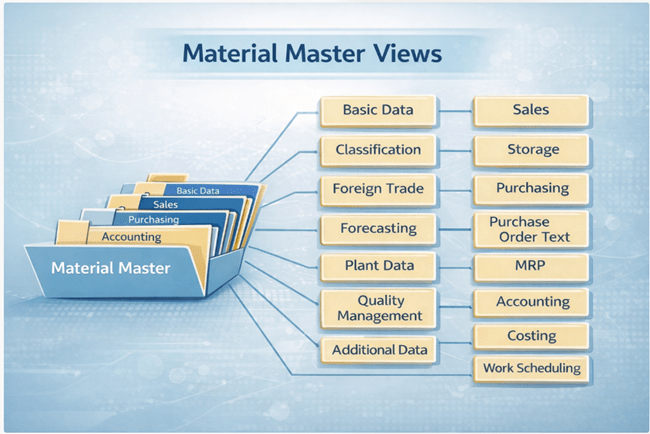
Just like in a real organization, each department accesses and updates only its own section, SAP follows the same principle.
Summary
Material Master views in SAP are not a technical complication—they are a structured and logical way to manage complex business processes.
By separating material data into views, SAP ensures:
- Clear accountability
- Better data quality
- Strong governance
- Scalable, high-performing systems
This design remains fundamental in SAP S/4HANA, supporting end-to-end supply chain, finance, and sales operations.
 Muhammad Hayat | SAP S/4HANA MM Consultant (Certified)
Leave a comment